

How to go live on TikTok

Going live on TikTok happens through the plus button in the app, but the LIVE option only appears if your account meets the requirements. Usually, you need at least 1,000 followers and you must be old enough under TikTok’s rules. If you do not see LIVE, it is often because of your age, your follower count, a temporary restriction on your account, or the region you are in.
Go live on TikTok in the app
If you have access to TikTok LIVE, you can start in just a few taps. Before you go live, make sure you choose a good title, check your camera and sound, and decide what your livestream will be about. A stream without a clear topic can feel messy, and viewers often swipe away quickly.
- Open the TikTok app.
- Tap the plus sign at the bottom to create something.
- Swipe at the bottom to LIVE.
- Choose a clear title for your livestream.
- Add a cover image, topic, or effects if you want.
- Check your settings, like comments, moderators, and filters.
- Tap Go LIVE to start.
During your livestream, you can switch cameras, use effects, manage comments, and add guests if that option is available. Want to stop? Tap the end button and confirm that you want to finish the LIVE.
What happens when you go live?
When you are live, followers and other TikTok users can discover your stream. Some followers may get a notification, but do not rely on that fully. TikTok mainly shows LIVE videos to people who are likely to keep watching or interacting. That is why it helps to say clearly right away what your stream is about.
Examples of strong LIVE titles are:
- “I’m answering your questions about my makeup routine”
- “Drawing live, give me ideas in the chat”
- “Testing new products with you”
- “Getting ready for tonight together”
- “Ask me anything about my latest video”
A title like “come live” or “hi” says very little. People often decide within seconds whether they stay on TikTok, so make it easy for them.
Why can’t I go live on TikTok?
If you do not see the LIVE option in your TikTok app, there is usually a clear reason. Go through these points calmly before thinking something is wrong with your phone.
1. You do not have enough followers yet
This is the most common reason. If your account is still below the follower limit, TikTok often does not show the LIVE option. You can still post videos, get comments, and grow, but you cannot livestream yet.
In that case, try making content that people understand quickly and want to share. Think of short tips, relatable situations, trends with your own twist, or videos where you ask a clear question. The more people react and keep watching, the better your chance that your video is shown more often.
If you want help growing your account, you can explore the TikTok options in the TikTok category at SocialKings. For accounts that are close to the LIVE limit, buying TikTok followers can help push your profile closer to that threshold. You can also support your video growth with buy TikTok views or increase live activity with buy TikTok livestream views.
2. You do not meet the age rules
TikTok checks age for features like LIVE and LIVE Gifts. If your account details show that you are too young, you will not get access. Never enter a false birth date on purpose just to unlock a feature. If TikTok later doubts your age, your account can get extra checks or limits.
3. Your account has a restriction
If you recently got a warning or posted content that breaks the rules, TikTok may block LIVE temporarily. This can happen because of hateful comments, dangerous actions, misleading content, nudity, or other behavior that does not fit the TikTok Community Guidelines.
Check your notifications in the app. TikTok often shows there if something was removed, restricted, or reviewed.
4. Your app is out of date
Sometimes a feature is missing because your app is not up to date. Update TikTok through the App Store or Google Play Store, then open the app again. It also helps to log out and log back in, especially if you just reached the follower limit.
5. The feature is not yet available for your account
TikTok does not always roll out features to everyone at the same time. Two accounts can use the same phone and still see different options. That is frustrating, but it is not unusual. If you meet all the requirements and LIVE still does not appear, you can report it in the app.
Contact TikTok if LIVE is missing
If you think you should have access to LIVE, you can report a problem:
- Open TikTok and go to your profile.
- Tap the menu in the top right.
- Go to Settings and privacy.
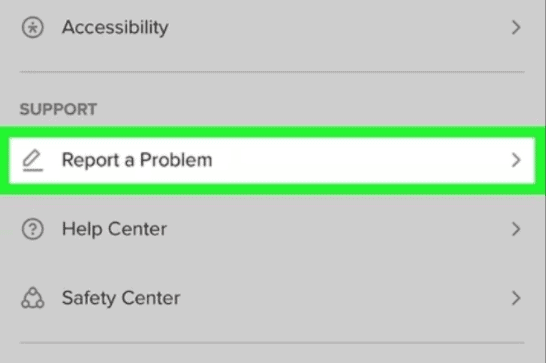
- Choose Report a problem.
- Look for LIVE or livestreams.
- Explain briefly that the LIVE option is missing even though you meet the requirements.
Keep your message simple. Do not just claim your age in a vague way. Refer to your account details and say that you do not see the feature in the creation screen.
TikTok LIVE Gifts and earning money
With TikTok LIVE, you can not only talk to viewers, but in some cases also receive LIVE Gifts. These are virtual gifts that viewers can send during your stream. TikTok has separate rules for this. You must be old enough, and your account must be eligible for the feature. You can read the official explanation in LIVE Gifts on TikTok.
Not every livestream earns money. Gifts usually come in when viewers feel involved. That happens faster when you really respond to the chat, say names, answer questions, and do something people want to keep watching.
Examples of livestreams that work well
- Q and A: great if you often get the same questions under your videos.
- Tutorials: for example makeup, drawing, cooking, fitness, or music.
- Product demos: useful for creators, small brands, and online shops.
- Challenges: let viewers vote or give you tasks.
- Behind the scenes: show how you make videos, outfits, orders, or projects.
If you want to understand how earnings on TikTok work more broadly, also read how much money you make with TikTok per 1,000 views. Livestreams, video views, collaborations, and gifts all work in different ways.
If you want to learn more about creator payments, TikTok also explains live gifting in the Creator Portal. For users on Android, the current TikTok app is available in the Google Play Store.
Tips for a better TikTok livestream
Going live is easy, but keeping viewers is harder. On TikTok, people come in fast and leave fast too. That is why a strong start makes a big difference.
Do not start by waiting
Many creators start a LIVE and spend the first minutes saying, “We will wait a bit until more people join.” For the people already there, that feels boring. Start with your topic right away. New viewers can always join in.
Better examples are:
- “Today I am choosing three outfits and you get to vote.”
- “I am answering questions about the video that just went viral.”
- “I am testing this product live, so ask anything you want.”
Use a simple structure
A livestream does not need to be tightly planned, but a simple structure helps:
- Say briefly what you are going to do.
- Ask the chat an easy question.
- Respond to the first comments.
- Repeat the topic now and then for new viewers.
- End by telling people what they can watch or follow next.
If you also post regular videos, you can use your LIVE to send more attention there. The other way around works too: post a short video before you go live to tell people when to join.
Make sure your light and sound are good
You do not need a studio. Sit near a window, keep your phone steady, and make sure people can hear you clearly. Bad sound makes people leave faster than a camera that is not perfect.
Reply to viewers, but do not get too distracted
The chat is the power of TikTok LIVE. Say someone’s name now and then, answer questions, and ask questions yourself too. But do not try to read every single comment if that makes you lose your story. In busy streams, it is better to pick out a few good questions at a time.
Curious about how visibility works for normal TikTok videos? Then how to get on the For You Page on TikTok is also worth reading.
How do you get more viewers on your TikTok LIVE?
Getting more viewers usually starts before you even go live. If nobody knows you will stream, you are depending on random passersby in the app.
Announce your LIVE ahead of time
Make a short video telling people when you will go live and why they should watch. Keep that video simple. Do not just say “I’m going live,” but give a reason.
Examples:
- “Tonight I will choose my outfit for the party live.”
- “Tomorrow I will answer all your questions about my skincare routine live.”
- “I will go live to choose the winners of the challenge.”
Go live when your followers are active
Check your analytics if you use a creator or business account. See when your followers are usually online. Evenings and weekends often work well, but that depends on your audience. Students, parents, and business owners all have different routines.
Stay live long enough to be discovered
A five minute stream gives you very little time to build viewers. It is better to stay live longer if you have a good topic. Repeat what you are doing regularly, because new viewers missed the start.
Give your livestream an early push
If you are just starting with LIVE, it can be hard to get the first viewers. An empty stream feels less attractive to new visitors. If you want to give your livestream more activity, you can look into buying TikTok livestream views. For your regular videos, buying TikTok views can help content get moving faster. Always combine this with good videos and a clear profile, because people only stay if your content is interesting.
Schedule a TikTok LIVE event
On some accounts, you can create a LIVE event in advance. That lets followers know when you will go live. It is useful for streams with a clear topic, such as a Q and A, product launch, workshop, or performance.
If the feature is available, it usually works like this:
- Go to your profile.
- Open the LIVE or event option if you can see it.
- Create a new event.
- Add a name, date, start time, and description.
- Share the event through a video, message, or your profile.
Make your description concrete. “Fun live” is weaker than “Live makeup routine for a festival look” or “I answer questions about starting fitness.” The clearer your event is, the easier it is for people to decide whether they want to join.
Go live with guests or a cohost
TikTok has features that let you go live with others. The name and availability can differ by account, but it often means inviting guests, doing a joint LIVE, or using a split screen feature.
This works especially well if:
- you want to have a conversation about a topic together;
- you want to reach each other’s audience;
- you are doing an interview, challenge, or debate;
- you want viewers to join in.
Choose guests carefully. Someone who keeps talking over you, swearing, or acting strangely can ruin your stream. Agree in advance on what the LIVE is about and what you do and do not want to discuss.
Manage comments, moderators, and blocked words
A good livestream feels safe and friendly. When you get more viewers, you may also get spam comments, strange remarks, or people who just want to disturb the chat. TikTok gives you tools to manage comments.
Add a moderator
A moderator can help keep the chat clean. That person can mute or block annoying users, depending on the settings available. This is especially helpful in larger streams or on sensitive topics.
Filter words
You can block certain words or phrases so comments with those words do not show up. Think of swear words, spam terms, or comments you keep getting over and over. It is best to set this up before you go live, so you do not have to keep stepping in during the stream.
Limit comments temporarily
If the chat gets out of hand, you can limit comments or remove users. Do not wait too long with this. One annoying person can spoil the mood for everyone, especially if you have already built a nice group of viewers.
Can you watch a TikTok LIVE again?
For viewers, a TikTok LIVE usually cannot simply be watched again after the stream ends. If you miss a LIVE, you often cannot replay it like a normal video. Sometimes a creator can save, download, or repost parts of it later, depending on the features available in the account.
As a creator, do not assume your livestream disappears completely for everyone. Viewers can use screen recording or send clips to others. So do not say or do anything live that you absolutely do not want seen outside your own stream.
Frequently asked questions about going live on TikTok
How many followers do you need to go live on TikTok?
Many accounts need at least 1,000 followers to see the LIVE feature. Your account also needs to meet TikTok’s age rules and community rules.
Why do I not see a LIVE button on TikTok?
This is usually because you do not have enough followers, your age, an account restriction, an outdated app, or because the feature is not yet available for your account. Update the app and check your account notifications.
Can you go live on TikTok without 1,000 followers?
For most users, you cannot. Some accounts, regions, or special features may differ, but do not count on it. The safest route is to grow until the LIVE option appears for you naturally.
Do all my followers get a notification when I go live?
Not always. Some followers may get a notification, but TikTok decides who sees your LIVE. That is why it helps to announce your livestream ahead of time with a regular video or event.
Can you earn money with TikTok LIVE?
Yes, through LIVE Gifts if your account is eligible. You can also earn indirectly by promoting products, services, partnerships, or your own brand.
What should I do if my TikTok LIVE was blocked?
First check whether TikTok sent you a notification. Read which rule may have been broken and appeal if you think the restriction is unfair. Do not immediately create a new account without understanding what happened, or you may run into the same problem again.
How long should a good TikTok LIVE be?
That depends on your topic. A short update may only need ten minutes, but a Q and A, tutorial, or product test often works better if you stay live longer. What matters more than the length is that something is happening that makes people want to stay.


